TraitCapture
Archived static copy of the TraitCapture project site — open source tools for high-throughput plant phenomics, long-term environmental monitoring, and data visualization.
This project is maintained by borevitzlab
The page below was archived as-is from the former TraitCapture website. For current and last available versions of TraitCapture code, please see the APPN-ANU GitHub, GitLab, and the Borevitz Group’s GitHub.
Code
TimeStream Tools — code snippets for organizing massive datasets of images
- All of our time-series images are named and structured in “TimeStream” format. TimeStreams were invented by TimeScience as a method to store and rapidly index and access time-series data (typically images) at any time resolution. TimeStreams implement a fixed naming structure for folders and image names, and the timestamp in the image name is fixed to the nearest time interval.
- Get the Code: We have developed a significant code base for processing huge
image sets (including disordered, poorly organized and unnamed sets of images -
you know, how your data probably is) into structured TimeStream folder and
naming structure.
- APPF ANU code is hosted on GitHub at https://github.com/appf-anu and https://github.com/borevitzlab
- TimeStream structured image sets are easily accessible and can be easily viewed with our fancy html5 timelapse player.
- Our code also includes functions for fast downsizing including with VIPS. All code processes output JSON files to facilitate rapid ingestion of your processed image datasets into databases and websites, etc.
- Python implementation:
- We are in the process of converting our Python code to GO for much faster, modular processing of images, working with TimeStreams and control of lights and chambers: https://github.com/appf-anu
- Advantages of TimeStream format:
- Most naming conventions use the actual timestamp of the captured image in the filename (e.g. an image captured at noon might have the name myimage-2017-08-09-12-00-59.jpg). While this approach has some utility, the downside, particularly for huge timelapse data sets, is that images never have a fixed or known filename. This can cause significant overheads when managing time-series image datasets of millions or more images. With non-fixed naming structure it is impossible to easily index files on disk or quickly traverse or sub-sample large image datasets without either tracking the filepath of every image in the system or polling the server on the fly to produce such a file list. For example, if one wants to access the noon image from a 5-year timelapse dataset without fixed image names, the user must crawl through every “noon” folder on the server and list the contents to find the filename. This issue can be potentially avoided by creating a database to track the name of every image on the server, but in practice this approach is very cumbersome and adds significant overhead both in terms of infrastructure and required staff time for maintenance of the system.
- By contrast, with images stored in TimeStream structure, to access any image on the server the user need only know the project name, folder structure and capture interval and they can programmatically construct the path to any image on disk without any server load. This process scales to timelapses of any length and file count as long as the time-step is invariant.
- Fixed file names provide a tool to reduce file management. In the above example, if a “noon” image is captured at 2017-08-09-12-00-59, the TimeStream standardized name is myimage_2017_08_09_12_00_00.jpg. Thus in the case of finding noon images, the “noon” image on the server will always be at projectname_timestamp_12_00_00.jpg no matter how large the timespan is, and the user need only create the filepath to the images they want and query the server to download them.
- To additionally facilitate programmatic interaction with data, projectname can not contain any underscores, and projectname and timestamp are separated by an underscore so that when writing code to interact with data, one need only “split” on the first underscore to reliably split out the project metadata contained in the filename and the timestamp.
- These projects are open source and we are eager to collaborate and share code, so if you are interested in using our timelapse tools, please contact us.
Tools for realtime monitoring
- High tech phenomics only works when your hardware is working. We have implemented extensive code for monitoring all our systems, from chambers to cameras to field sites. Data is stored in InfluxDB and visualized online using Grafana. Errors and alerts are sent to a Slack channel and logged as GitHub issues and assigned to the appropriate staff person who is on call at the time of the error. SMS and email alerts are also available for researchers using our systems.
- Realtime data from projects, chambers and sensors: https://grafana.traitcapture.org
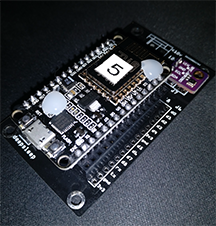
Low cost mesh sensor tools — Nodemcu
- We have been developing a low cost wifi mesh sensor system for automated monitoring of all our controlled environments and for field usage.
- The system is a custom low-power board using NodeMcu with onboard wifi, supporting a number of sensors (temperature, humidity, light, air quality, etc).
- Approximate cost of all components is <$15AUD.
- Git repo here: https://github.com/appf-anu/nodemcu-collector (and contact us if you want to collaborate)
TraitCapture camera control system for open source phenotyping and monitoring
- The spc-eyepi code was developed to make it easy to capture time-lapse data from any camera from a DSLR to a USB webcam.
- The system is very modular, so if you have a new camera not covered by our current code, it is easy to create a new camera module.
- Current camera types supported (RGB and RAW capture):
- Most current and recent model Canon DSLR (T-series and D-series) and Nikon cameras
- All UVC-compliant USB web cameras including the e-con 13MP USB cameras
- Raspberry pi on-board cameras (RGB and nIR)
- Point Grey BlackFly cameras (driver installation is somewhat involved due to Point Grey lack of open source support)
- Get started with the Documentation or go directly to the Code on GitHub
- Please submit a git issue directly if you run into any issues
- Contact us if you want to collaborate or have any questions
TimeLapse and VR point cloud viewer
- We have been working with Ajay Limaye at the VisLab at NCI to develop a time-series and VR point cloud viewer.
- The point cloud viewer has a desktop version and a VR version.
- Try it out!
- Download the desktop software
- Code
- LasVR works with any pointcloud on the TraitCapture website. When you are viewing one of our point clouds, look for the “download” icon on the bottom right of the page. We recommend downloading the folder as a ZIP file, 7-zip has issues with extracting our tar.gz pointcloud files on windows. Once you have downloaded and unzipped it, run LasVR then drag and drop the pointcloud folder onto the LasVR program to view it. See LasVR instructions for more detail.
TraitCapture plant phenotyping and segmentation pipeline
- Phenotyping pipeline developed for the TraitCapture project. Takes time-series images of a chamber or chambers of Arabidopsis or other small non-3D plants and outputs time-series phenotype data.
- Code: https://github.com/borevitzlab/timestreamlib
Data access and published datasets
All our data is public and freely available. Browse and download all of our datasets here: https://data.traitcapture.org/
Documentation for interacting directly with our website via the API exists here: https://borevitzlab.github.io/site-phenocam-org/
Published datasets
- Deep Phenotyping: Deep Learning For Temporal Phenotype/Genotype Classification.
Sarah Taghavi Namin, Mohammad Esmaeilzadeh, Mohammad Najafi, Tim B. Brown, Justin
O. Borevitz. bioRxiv 134205; doi:
https://doi.org/10.1101/134205
- Download data:
- From Figshare
- From TraitCapture
- Download data:
Please contact us if you have any questions or would like to collaborate on any projects related to open source code, point clouds or phenotyping.
3D models and other hardware
- Raspberry pi camera and sensor case
- This case is designed to be mounted on the PAR sensor arm in a Conviron or
similar growth cabinet.
- The 180 camera is designed to monitor the lights but you could extend the camera ribbon or mount the camera at the top of the chamber to use it for phenotyping.
- The camera assembly controls two DSLR cameras as well as the 180 picam and the temperature and humidity sensor to monitor the chamber.
- Download the 3D printable files for the case here: https://github.com/borevitzlab/rpi-chamber-cases
- 180-degree pi camera: Search ebay for “180 pi camera”
- Temp/Humidity Sensor: Search for DHT22 Temperature and Humidity Sensor (make sure to get a pre-wired one unless you like soldering)
- This case is designed to be mounted on the PAR sensor arm in a Conviron or
similar growth cabinet.
- 3D printable mount for the E-Con 13mp webcam
- The E-Con 13MP web cameras are great, but the board cameras suffer from poor hardware design with a very weak flexion point at the USB3 cable connection. We designed a 3D printable mount that provides the camera with both a standard 1/4” tripod mount and safely secures the USB cable to prevent breakage.
- 3D files: https://github.com/borevitzlab/rpi-18mp-cam-enclosure
- Camera: https://www.e-consystems.com/See3CAM-USB-3-Camera.asp
- Many point clouds are online here:
https://traitcapture.org/pointclouds
- Download links for the original data are on the pages for each model
- To download the potree converted point cloud files (i.e. for viewing in the Point Cloud viewer tools, etc), browse to https://data.traitcapture.org/pointclouds_potree/
- Some 3D models are on SketchFab here: https://sketchfab.com/borevitzlab
Using / Citing our work
- Before re-publishing or using any of our data, we ask that you contact us first and
cite the relevant paper, or cite the paper below if there is not an existing
citation:
- Brown, Tim B., et al. TraitCapture: genomic and environment modelling of plant phenomic data. Current opinion in plant biology 18 (2014): 73-79.
- Use of any of our data or code requires acknowledgement for the Australian Plant Phenomics Facility wherever appropriate.